
Revoke smart contract permissions before malicious dApp updates drain your Web3 wallet balance. Audit 5 production-grade security dashboards today.
- 5 Best Liquid Staking Derivatives Protocols Reviewed for Maximizing Cross-Chain Passive Income Yields
- What is an NFC Hardware Wallet? A 3-Step Setup Guide
- 15 Safest Non Custodial Wallets Featuring Advanced Clear-Signing Shields
- 10 Best Crypto Staking Platforms to Build Consistent Monthly Passive Income Streams
- 4 Trading Mistakes a Bitcoin Liquidation Heat Map Helps You Avoid
Revoke smart contract permissions regularly to protect your assets from architectural vulnerabilities and prevent malicious platforms from executing total balance liquidations. Interacting with decentralized applications requires users to grant open spending authorizations before executing token swaps or staking pool deposits. However, malicious platforms often trick users into signing infinite approvals, leaving balances highly vulnerable to future exploitation.
Related: Revoke Smart Contract Permissions (EVM & Solana): 5 Emergency Dashboards Evaluated
When an open spending allowance remains unchecked, third-party smart contracts retain the absolute right to pull tokens directly from your wallet address at any time. Securing your crypto assets requires moving beyond standard local hardware protections and actively cleaning your on-chain token exposure history.
Explaining Token Approvals and the Need to Revoke Smart Contract Permissions

Every modern decentralized protocol operates on an architecture built around explicit user spending allowances. When you interface with an automated market maker, the network asks for permission to move a specific quantity of your tokens. To simplify future user experiences and minimize gas overhead, many interfaces default to requesting an infinite spending limit.
If that platform suffers a future smart contract compromise or turns into a malicious rug pull, attackers can utilize those standing open allowances to siphon your assets. Learning how to revoke smart contract permissions allows you to break these active data bridges between your private keys and vulnerable external smart contracts.
- Infinite Spending Allowances: Authorizations that permit a protocol to spend an unlimited number of tokens from your address without asking for further physical device signatures.
- Malicious Front-End Phishing: Spoofed application layouts that replace safe transaction data packets with hidden approval mechanisms designed to extract capital.
- Legacy Protocol Vulnerabilities: Secure applications that become vulnerable over time due to key leakage or unpatched software upgrades.
Evaluating 5 Emergency Dashboards to Revoke Smart Contract Permissions
Read More : 5 Best Liquid Staking Derivatives Protocols Reviewed for Maximizing Cross-Chain Passive Income Yields
When an application exploit occurs, reacting quickly is crucial to saving your digital assets. These five production-grade security interfaces give users the ability to search, filter, and revoke smart contract permissions across multiple blockchain networks instantly.
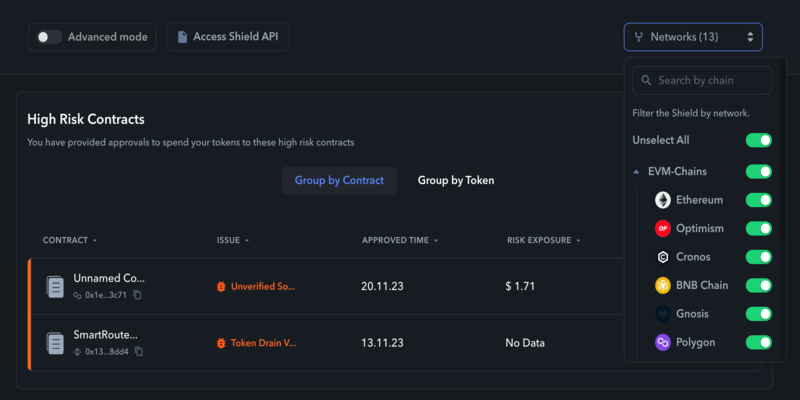
- Revoke.cash: The industry-standard open allowance manager, offering native multichain support across dozens of EVM environments alongside clear risk tracking markers.
- Etherscan Token Approval Tool: A native interface built directly into the core blockchain explorer that lets users review and nullify open spending parameters using verified smart contract data.
- Solana Token Program Manager: A specialized tool built for the Solana network ecosystem designed to clear standing programmatic authorizations on SPL tokens.
- Rabby Wallet Security Center: An integrated software-based tracking dashboard that actively monitors open allowances and allows users to remove them without visiting third-party sites.
- Unrekt: A mobile-optimized decentralized application built exclusively to audit open spending parameters and clean up multi-chain token exposures on the go.
| Dashboard Name | Primary Network Architecture | Verification Vector | Revocation Speed |
| Revoke.cash | EVM & Select Non-EVM | Multi-Chain Node API | Fast Execution |
| Etherscan Approvals | Ethereum Mainnet Layer | Native Contract Ledger | Instant Broadcast |
| Solana Program Manager | Solana Network Ecosystem | SPL Account Records | Fast Execution |
Analytical Comparison of Cross-Chain Security Interfaces
EVM networks and the Solana blockchain handle spending authorizations using completely different underlying record systems. EVM chains use a specific mapping function within each independent token contract to log open spending limits. Solana manages allowances by generating individual token accounts that link your main wallet public address to specific application protocols.
To check for live protocol warnings and read real-time smart contract security logs, visiting the active monitoring center on CryptoInsight will help optimize your defense response times. Understanding these structural variations allows you to determine exactly when and how to revoke smart contract permissions when an emergency arises.
| Technical Parameter | EVM Network Approvals | Solana Token Delegations |
| Storage Architecture | Centralized map inside token contract | Isolated individual token account data |
| Gas Cost Structure | Standard transaction cost to rewrite variable | Minimal fee to close account or clear authority |
| Revocation Logic | Update spending limit value to zero | Completely remove the data delegation pointer |
Step-by-Step Technical Guide to Revoke Smart Contract Permissions Natively
Follow this systematic operational guide to audit your current on-chain exposure and revoke smart contract permissions using verified security interfaces. Executing these steps regularly helps keep your active digital assets completely isolated from legacy smart contract exploits.
Step 1: Connect Your Interface to a Security Dashboard
Navigate to your chosen verification platform and connect your hardware or software storage tool. Ensure you are using the official URL link to avoid interacting with a spoofed phishing page.

Step 2: Analyze Your Standing Open Spending Limits
Read More : Real World Asset Tokens Analysis: 3 Hidden Gems Outperforming Large-Caps
Review the generated list of active asset permissions across your different wallet addresses. Focus your attention on any entries displaying unlimited or infinite token spending access paths.
Step 3: Trigger the Smart Contract Revocation Process
Click the clear button located next to the specific contract address configuration you want to disconnect from your account balance. Your browser extension will display an allowance update prompt.
Step 4: Verify and Broadcast the Network Transaction
Confirm the transaction payload details directly on your physical hardware screen or local wallet interface. Approve the network fee to permanently revoke smart contract permissions on that specific protocol.
- Regular Asset Audits: Schedule a monthly review session to clean out unspent token allowances on older applications you no longer use.
- Custom Spending Allocations: Manually edit token approval values during trades to match the exact transaction size rather than accepting infinite defaults.
- Complete Session Disconnection: Disconnect your active wallet profile links from decentralized applications immediately after completing your trading activity.
Proactively managing your open token allowances completely breaks the attack vectors that malicious actors rely on to execute remote wallet drains. If you notice suspicious wallet activity or see warning signs on security forums, you must use your backup tools to revoke smart contract permissions instantly before any unauthorized drainers execute. Making these on-chain cleansing methods part of your routine protects your portfolio over the long term. By checking your open spending limits and utilizing verified revocation dashboards, you can navigate the web3 ecosystem with confidence.
Source: https://cryptoinsight.news
Category: News